This is default featured slide 1 title

Go to Blogger edit html and find these sentences.Now replace these sentences with your own descriptions.This theme is Bloggerized by Lasantha Bandara - Premiumbloggertemplates.com.

This is default featured slide 2 title

Go to Blogger edit html and find these sentences.Now replace these sentences with your own descriptions.This theme is Bloggerized by Lasantha Bandara - Premiumbloggertemplates.com.

This is default featured slide 3 title

Go to Blogger edit html and find these sentences.Now replace these sentences with your own descriptions.This theme is Bloggerized by Lasantha Bandara - Premiumbloggertemplates.com.

This is default featured slide 4 title

Go to Blogger edit html and find these sentences.Now replace these sentences with your own descriptions.This theme is Bloggerized by Lasantha Bandara - Premiumbloggertemplates.com.

This is default featured slide 5 title

Go to Blogger edit html and find these sentences.Now replace these sentences with your own descriptions.This theme is Bloggerized by Lasantha Bandara - Premiumbloggertemplates.com.

Showing posts with label keyboard. Show all posts

Friday, March 23, 2012

Download Typing Master pro v7 full

Typing Master pro is the best software to improve your typing skills.
Typing Master Pro put your typing fingers in place. The slick interface and easy-to-follow instructions walk you through well-designed lessons, drills, and games. A special mode called Satellite watches how you type when you use certain programs, such as a word processor. It then identifies words or keys you have trouble typing and creates personalized exercises to help you improve. The typing tests show graphically which finger you should use for each keystroke, and they're smart enough to adjust their duration to your level of skill.


   DOWNLOAD 


Monday, March 5, 2012

30 hot keys for all new Windows 8


Hotkeys allow you to save time by quickly accessing menus and performing different tasks, which may take more time when done with mouse. Windows 8 Consumer Preview was launched some days ago, and along with the new user interface, also came new hotkeys to access the new menus included in Windows 8. We thought it would be nice to compile a list of shortcuts that you will find very useful while using Windows 8. Some of the shortcuts are same as Windows 7, but a lot have changed, too. Keep reading to find out some easy access hotkeys for Windows 8.


Windows-8-Hotkeys
  • Win + Print Screen – Take Screenshot (Saves as PNG in Pictures Library)
Pictures
  • Win + C – Open Charms Bar
Charms Bar
  • Win + Tab – Open Switch List


  • Win + Q – Open Global Search
Search Apps
  • Win + W – Search Within System Settings (Allows you to search directly within System Settings)
  • Win + F – Search Within Files (Allows you to search directly within Files)

  • Win + Z – Access Options of Metro Apps (Can also be accessed by right-clicking on an empty space)
Metro Apps Options
  • Win + I – Open Settings Menu
Settings Menu
  • Win + P – Open Second Screen/ Projector Settings (For dual monitor setup)
Projector Settings
  • Win + H – Go to Share Settings Pane (Lists sharing options relative to currently running app)
  • Win + K – Open Devices Settings Pane (Lists currently connected devices)
  • Win + X – Open System Utility Settings Menu in bottom-left corner.
System Utility Settings
  • Win + T – Preview Opened Windows in Taskbar (Brings up the window thumbnail from taskbar one by one)
  • Win + U – Open Ease of Access Center
Ease of Access Center
  • Win + E – Open Windows Explorer
  • Win + R – Open Run Dialogue Box
  • Win + Pause – Open System Properties Window
  • Win + Enter – Open Windows Narrator

  • Win + Shift + . – Snap Application to Right Side (Toggles between Right side, Left side and Full Screen)
Snap App to Right
  • Win + . – Snap Application to Left Side

  • Win + , – Peek at Desktop (Aero Peek)
Aero Peek
  • Win + D – Go to Desktop
  • Win + M – Minimize All Applications
  • Win + B – Go Back to Desktop
  • Win + J – Switches focus between snapped Metro applications
  • Win + L – Lock Screen

  • Win + Page Up/ Page Down – Switch Primary & Secondary Monitors (Dual Display)
Screen Resolution

  • Ctrl + Mouse Scroll (In Start Screen) – Tile Zoom Toggle
  • Ctrl + Mouse Scroll (In Desktop) – Change Desktop Icon Size
  • Ctrl + Shift+ N – Create New Folder in Current Directory

Monday, December 5, 2011

Ice Cream Sandwich Keyboard on any anDroid mobile


Ice Cream Sandwich Keyboard is one of the newest keyboard available for Android 4.o with lots of new features. Now you can use it on your older Android devices without rooting. To try the new Keyboard you have to download and install the new Ice Cream Sandwich Keyboard app from Android market. This keyboard is only compatible with phones and it doesn’t play nice with tablets.
Ice Cream Sandwich Keyboard can be installed on almost all devices that are based on the said Android 2.2 or newer versions of Google’s platform. It supports whole lot of languages like English, French , Hebrew, Arabic, German, Czech, Bulgarian, Catalan, Spanish, Esperanto, Danish, Italian, Finnish, Georgian, Russian, Ukrainian, Latvian, Swedish,Latin, Dutch, Portuguese, Slovakian, Slovenian, Greek,Serbian, Hungarian,Swiss.
How to Install Ice Cream Sandwich Keyboard

How to Install Ice Cream Sandwich Keyboard on Your Android Phone:-
1. Go to the Android market and download the Ice Cream Sandwich Keyboard app
2. After the installation go to your home screen and press the menu button and then choose Settings > Language & keyboard section.
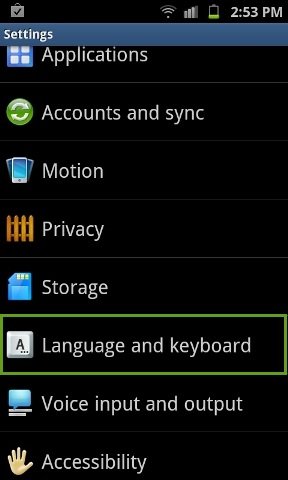
3. Now Check the box next to Ice Cream Sandwich keyboard and after that tap on Ice Cream Sandwich keyboard settings.
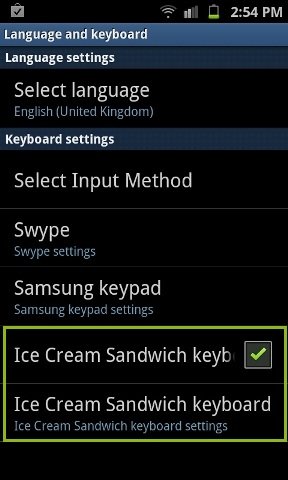
Ice-cream-sandwich-keyboard
4. Now you can see the Ice Cream Sandwich keyboard settings, adjust the keyboard setting as per your requirement.
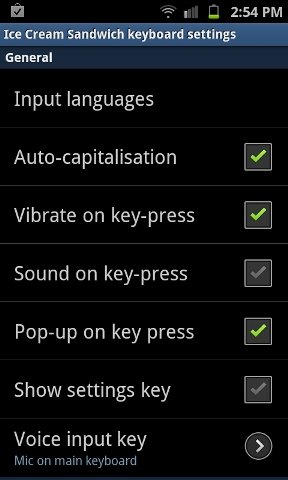
Ice-cream-sandwich-keyboard-settings
5. After this, go back to home screen open Gmail or SMS to write something. Now Press and hold on the input area. Select Input method.

6. And now Select Ice cream Sandwich Keyboard from Select Input method.

7. That’s it now you are are using the new Android 4.0 Ice Cream Sandwich Keyboard on your Android phone.
ice-cream-sanwich
Note that some features may be a little buggy; this is because the keyboard is in beta and your device is running a different version of Android.
 

Monday, September 12, 2011

List of All 255 KeyBoard All Alt Key Codes


image
Hey Guys, Do you know that you can use Alt Codes for using Keyboard Keys.
So here is the List of all 255 Keyboard Alt codes that you can use .

Alt Codes : These are the symbols that are not on keyboard but can be produced by pressing
a simple alt key along with some number of codes from Numpad .Pressing these two keys
simultaneously gives you a symbol.
Always Use NUMPAD to type the numbers .

In these Tables One column of Symbol and Other for the Number which give this symbol with
Pressing "Alt + " .

Steps : 1) first Press 'Alt' key 2) By pressing this key press any number given in the list 1 to 255 , then Leave these keys . You Will get the Required Symbol .

SymbolNumber
1
2
3
4
5
6
7
8
9
10
11
12
13
14
15
16
17
18
19
20
§21
22
23
24
25
26
27
28
29
30
31
space32
!33
"34
#35
$36
%37
&38
'39
(40
)41
*42
+43
,44
-45
.46
/47
048
149
250
351
452
553
654
755
856
957
:58
;59
<60
=61
>62
?63
@64
A65
B66
C67
D68
E69
F70
G71
H72
I73
J74
K75
L76
M77
N78
O79
P80
Q81
R82
S83
T84
U85
SymbolNumber
V86
W87
X88
Y89
Z90
[91
\92
]93
^94
_95
`96
a97
b98
c99
d100
e101
f102
g103
h104
i105
j106
k107
l108
m109
n110
o111
p112
q113
r114
s115
t116
u117
v118
w119
x120
y121
z122
{123
|124
}125
~126
127
Ç128
ü129
é130
â131
ä132
à133
å134
ç135
ê136
ë137
è138
ï139
î140
ì141
Ä142
Å143
É144
æ145
Æ146
ô147
ö148
ò149
û150
ù151
ÿ152
Ö153
Ü154
¢155
£156
¥157
158
ƒ159
á160
í161
ó162
ú163
ñ164
Ñ165
ª166
º167
¿168
169
¬170
SymbolNumber
½171
¼172
¡173
«174
»175
176
177
178
179
180
181
182
183
184
185
186
187
188
189
190
191
192
193
194
195
196
197
198
199
200
201
202
203
204
205
206
207
208
209
210
211
212
213
214
215
216
217
218
219
220
221
222
223
α224
ß225
Γ226
π227
Σ228
σ229
µ230
τ231
Φ232
Θ233
Ω234
δ235
236
φ237
ε238
239
240
±241
242
243
244
245
÷246
247
°248
249
·250
251
252
²253
254

255


Amaze all your friends on Facebook

Related Posts Plugin for WordPress, Blogger...