This is default featured slide 1 title

Go to Blogger edit html and find these sentences.Now replace these sentences with your own descriptions.This theme is Bloggerized by Lasantha Bandara - Premiumbloggertemplates.com.

This is default featured slide 2 title

Go to Blogger edit html and find these sentences.Now replace these sentences with your own descriptions.This theme is Bloggerized by Lasantha Bandara - Premiumbloggertemplates.com.

This is default featured slide 3 title

Go to Blogger edit html and find these sentences.Now replace these sentences with your own descriptions.This theme is Bloggerized by Lasantha Bandara - Premiumbloggertemplates.com.

This is default featured slide 4 title

Go to Blogger edit html and find these sentences.Now replace these sentences with your own descriptions.This theme is Bloggerized by Lasantha Bandara - Premiumbloggertemplates.com.

This is default featured slide 5 title

Go to Blogger edit html and find these sentences.Now replace these sentences with your own descriptions.This theme is Bloggerized by Lasantha Bandara - Premiumbloggertemplates.com.

Showing posts with label Internet explorer. Show all posts

Sunday, May 13, 2012

How to remove Facebook Timeline


Hello guys! As many people don't like facebook timeline, they want old facebook back, but there was no option for this. So if you are also one of them and want to hide or remove the Facebook timeline from your Facebook profile or Facebook pages, then you have to try a new addon from Timeline remove.
This is the best and easiest method to do it. The best part of this app is that it will work on any browser like Firefox, Chrome, Safari, Internet Explorer. Just install the addon in your favorite browser and remove Facebook timeline from your Facebook Profile and Facebook pages. Follow the below steps to install the Facebook timeline removal addon.

How to Remove Facebook Timeline:

Step 1. First of all visit http://www.timelineremove.net/ to install the addon on your browser.

Step 2. After the installation just restart your browser to see the changes on your Facebook timeline.

Step 3. Now your Facebook timeline is removed from your Facebook profile and Facebook pages.

That’s it now you can enjoy your Facebook without the Timeline feature.

How to Enable Timeline Again:

Now the question is how we can enable it, if we wanna use it in future. Just disable addon to view Facebook’s Timeline once again.
In Firefox Go to Addon and disable the Timeline, remove addon and in Google Chrome go to Setting > Extension and remove the Timeline Remove extension

Tuesday, November 8, 2011

Top 20 websites for free e-book downloads


Now a days when Internet is one of our best friend, you can get anything and everything on internet. Also Books are really helpful to us with books we keep our self up to date. Nowadays, you can find many popular and non-popular books online as a eBook. Ebook – An electronic book (also e-book, eBook, electronic book, digital book) is a book-length publication in digital form, consisting of text, images, or both, and produced on, published through, and readable on computers or other electronic devices.
So eBooks are the best way to keep our self up to date, you can read them easily on your PC, laptop, e-Readers or e-book devices. Nowadays, you can find pretty much any popular (and not) book online. You just need to know where to look.

So today we have come up with a list of some really useful sites where you can find the books and magazines. Here is the list of 20 Best Sites to Download Free E-Books.
Facebook Fan Page
1. FreeBookSpot


From FreeBookSpot you can find and download free ebooks like scientific, engineering, programming, fiction and many other books. No registration is required to download free e-books. It has a huge collection of free eBooks and No registration is required to download free e-books.

2. Gutenberg


It has the largest collection of public domain books. Project Gutenberg offers over 36,000 free ebooks to download to your PC, Kindle, Android, iOS or other portable device. Choose between ePub, Kindle, HTML and simple text formats.

3. Free-eBooks


Discover great fiction, from romance to mystery, or non-fiction, from business information to self-improvement. Simply Login or Register now. Easily browse Categories & Authors. Or type in your query above to search.

4. Scribd


You’ll find lots and lots of free ebooks here. You only need to know what to look for. Scribd is a social publishing site, where tens of millions of people share original writings and documents.

5. 20200k


A big collections of ebooks in different categories like Art,photography,Spirituality,Science,mystery and thrillers etc

6. ManyBooks


There are more than 29,000 eBooks available for Kindle, Nook, iPad and most other eReaders, and they’re all free! If you still can’t decide what to read you might want to browse through some covers to see what strikes your fancy.

7. Google books


Search and preview millions of books from libraries and publishers worldwide using Google Book Search. One of the best way to search and download your favorite eBook.

8. GetFreeEBooks


Getfreeebooks.com is a free ebooks site where you can download totally free legal ebooks, available in various popular formats. Lots of categories to choose from, no registration required and updated often for your reading pleasure.

9. Free PDF ebooks


Search and download all the latest books in PDF format. All of them are free.

10. FreeComputerBooks


It has a huge collection of free online Computer, Programming, Mathematics, Technical Books, Lecture Notes and Tutorials.
Facebook Fan Page
 11. ebookee


ebookee is a free eBooks download search engine where you can find relevent links for numerous e-books.

12. FreeTechBooks


FreeTechBooks lists free online computer science, engineering and programming books, textbooks and lecture notes, all of which are legally and freely available over the Internet.

13. UFindBook


UFindBook offers free ebooks download more than 200,000 titles categorized in format of pdf, chm, html.

14. KnowFree


KnowFree is a web portal where users are able to exchange freely e-books, video training and other materials for educational purposes and self-practice.

15. OnlineFreeEBooks


You can download lots of ebooks here in different categorizes like Automotive Ebooks, Business Ebooks, Engineering Ebooks, Gadget Ebooks, Hardware Ebooks, Health & Medical Ebooks, Hobbies Ebooks, Programming & Technology Ebooks, Sport & Martial Art Ebooks.

16. PDFoo


PDFoo.com was developed for free services to provide resources of PDF files. All files based on popular section and it short by number of the most download by people.

17. ebooks-space


Its a Free Downloadable eBooks Website Online where you can find books ranging from the tpics like Computer IT, Programming Language, Software Development, Tutorial & Database Design in PDF-CHM file format.

18. Planet eBook


This site is the home of free classic literature. All novels and books here are entirely free to download and share.

19. MemoWare


Thousands of Free Ebook and PDA Documents for your Handheld Computer or Smartphone!

20. SnipFiles


SnipFiles offers you free ebooks and software legally by brought or attained PLR, resale or master rights to all the products on their page.
 Facebook Fan Page

Wednesday, October 26, 2011

UC Browser 8.0 Official English (Android/Symbian) and Diwali Edition (Java) Released


The new UC Browser v8.0 has been released officially for International users. The new UC Browser 8.0 version brings all new UI and splash screen for Symbian users and a new U3 kernel for Android which make browser more powerful and beautiful. UC Browser (Ucweb) v8.0.4.105 (Build 11102120) available for Android and Symbian currently. Though Java, Blackberry, PPC etc need to wait more. Symbian version available only for S60v3 and S60v5, coz UC has stopped the further development for S60v1 and S60v2, means no UC Browser v8.x for them. The reason is new UC Browser series based on new U3 core by developed by UC Mobiles and some old phone's hardware limit not suitable for this.

Whats New in Android Version:
1. Click to zoom and the contents you want to see automatically fit your screen.
It’s so intelligent that other browser can only zoom and the pictures and texts are disappeared to anywhere else.
2. It’s so convenient to switch UA that make you browser www. Page by phone easily.
3. Traffic statistics.
Let’s have a look at how much traffic and money UC has saved for you. Maybe you can buy a ring for your wife.

Whats New in Symbian S60 V3 / V5:
1. UC Browser 8 for Symbian supported new UI interface and splash screen.
2. More intimate guidance by adjusting the wizard contents for new users.
3. Moving Read Mode entrance to shortcut menu.

Diwali Edition for Indian Users:
The special Diwali version made for Indian user to Celebrate Diwali with themes and look of this festival. Its also prepared and you'll see the changes automatically made for your installed browser using cloud technology of UC Browser. Start page changed to this occasion and also added theme in theme section. To download this version and check other Diwali special visit this UC Browser Diwali page.
Or download: UC Browser Diwali Edittion.jad.

Download UC Browser 8.0.3.107 Official English Version for Android and Symbian:
DOWNLOAD (Symbian S60v5, 1.7 MB)
DOWNLOAD (Symbian S60v3, 1.3 MB)
DOWNLOAD (Android version is now available, 5 MB).

25 Best Firefox extensions(Add-ons)

Firefox is my weapon of choice when it comes to browsing the web. It’s fast, free, and gives the user the best feature ever: Choice.
The beauty of the Firefox extension is that it allows you to add a specific feature or function, fully customizing your browsing experience. For someone wanting to make the most of their online time, this is a huge opportunity. There are limitless ways to tailor your browsing with Firefox extensions. Here are 25 of my favorite extensions that help me save time while online.


  1. Autocopy – The name pretty much says it all. Instead of having to hit cmd+c (or ctrl + C for our Windows readers), every time you highlight text it automatically copies it to the clipboard. If you don’t want it on 100% of the time, you can toggle it on and off in the bottom-right of the browser.
  2. Better Gmail – A must-have for any Gmail user. Maintained by the legendary Gina Trapani of Lifehacker, Better Gmail adds some killer features that would make any developer at Google scratch their head and wonder “Why didn’t I think of that?!”. Keyboard macros, saved searches, right-click preview views and integrate Google Reader to name a few. (The keyboard macros are enough of a reason to install this little filly, in my humble opinion.)
  3. Better GReader – Another gem from Gina for Google Reader. Add feeds to GReader and bypass the default add page from Google, make the most of the reading area and take advantage of some great keyboard shortcuts, to name a few.
  4. No Squint – Finding yourself going cross-eyed form leaning too close to the monitor? No Squint can fix it. Specify a percentage to show all text that’s larger than the default for your screen resolution. You can either make all sites a default size, or only specify a few with different font sizes.
  5. Remember the Milk for Gmail – If you’re a fan of the todo list application Remember the Milk, you’ll love this extension. Fully mange your todo items inside of Gmail, instead of having to trek over to the RTM website every time you want to check off a task. You can also quickly assign emails as tasks. Very slick.
  6. Shareaholic- An indispensable extension for those who do a lot of social bookmarking with digg, del.icio.us, twitter, or maintain a tumblelog. In one click you can share the page you’re on with the previously mentioned services (plus a few more) without spending any more time than you have to away from the article.
  7. LeechBlock – If you’re feeling a little vulnerable to the addictive qualities of certain websites, use LeechBlock to literally force you from visiting them within a certain time period of the day. No joke. Not for the faint of heart, or those with problems with authority.
  8. Read it later – Don’t have time to really focus on an article you’ve found? This extension will enable you to quickly save the page you’re browsing until you’re able to read it. Once you’re ready to read your saved articles, the extension will open the articles in new tabs with the click of a button.
  9. Scrapbook – Much like the Read it Later extension, Scrapbook allows you to quickly save pages for later reading. However, it has a few more great features, like taking whole snippets of pages (like Google Notebook), searching within snippets, saving whole websites, and you can even organize the snippets like bookmarks. Perfect for researching or in-depth bookmarking.
  10. Meetimer- Meetimer is a great way to get a handle on just how much time you’re spending on various sites around the web. You can group sites into categories (ie. facebook.com = “procrastination”), and track just how much
  11. Copy Plain Text- The name pretty much says it all. If you do a lot of writing in WYSIWYG editors (blogging and other word processors), then this extension can come in pretty handy. Copy Plain Text will leave all the bolds, italics and other unwanted formatting when you copy and paste into text fields.
  12. Ad Block Plus- For those obsessed with a zen-like minimalist approach to web browsing, this Ad Block Plus will surely keep you focused. Kill annoying banners and ads by simplying installing the extension and right-clicking the banner on the page. Once you’ve clicked the banner, you’ll never see it again as long as the extension is turned on.
  13. Gmail Conversation Preview – A nifty little Greasemonkey script that allows you right-click and see the body of the email, without opening it. Simple and slick.
  14. Invisibility cloakLifehacker’s solution to blank out certain time-wasting sites that kill productivity. This is a much smaller version of LeechBlock.
  15. Add a second inbox to your Gmail account – Quickly and easily toggle between Gmail inboxes. Perfect for those with a business and personal email accounts at Gmail.
  16. FEBE – On the surface, FEBE will quickly and easily backup your Firefox extensions. But the fun doesn’t stop there. You can also sync multiple computers with the same Firefox extensions, and even set up automatic backups, ensuring that you’ll never lose your Firefox configurations again.
  17. del.icio.us bookmarks – Save, search and share your Del.icio.us bookmarks easily inside of Firefox. Browsing your bookmarks is especially easy with the del.icio.us sidebar.
  18. Googlepedia – I find this extension extremely valuable for getting a more holistic Google search. Googlepedia splits the Google search results in half and shows the relevant Wikipedia page for the search alongside the Google results.
  19. Errorzilla Mod – This extension is pretty nifty for troubleshooting error pages that you might come across, giving you the Google Cache, Wayback Machine, Whois, and tons of other useful information about the site and page in question.
  20. PageaddictPageaddict simply shows your internet usage by website. It’s not as intrusive as Invisibility Cloak or LeechBlock, but it can provide a helpful look at where you really spend your time online.
  21. urlfixer – I can’t tell you how many times I’ve typed in “gmail.cmo” to get a frustrating error page. Instead of having to perfectly type in every url, urlfixer can usually guess where you’re trying to go, and will send you there anyway.
  22. Colorful Tabs – This extension is deceptively useful. Much like office file-folder tabs, colorful tabs gives a color to each tab opened in Firefox. Quickly find which tab you need without having to read it.
  23. Faviconize Tab – Save some serious tab bar real estate with Faviconize tabs. With a simple right-click, you can shrink each tab to only the size of the favicon (16×16px), giving you much more room for open tabs.
  24. Google Notebook- Google notebook is another bookmarking tool, except it can save whole excerpts from pages, images and links. Quickly save all parts of a page into an digital “notebook” for easily collecting. Not quite as nifty as the Scrapbook extension, but definitely a contender.
  25. Dictionary Tooltip – A perfect companion for any writer. Just highlight any word and hit Ctrl + Shift + D to see the word’s definition, without having to open a new window.

Sunday, October 23, 2011

How to make your laptop a wifi HOTSPOT

Turn your computer into a fully featured software router and share any Internet connection with your friends, co-workers, and mobile devices.


Highlights of Connectify Pro Include:

Share Wi-Fi from 3G/4G Networks – Connectify Pro now supports sharing Internet from 3G/4G cards in addition to a wide variety of other USB cards and dongles
“Scannify” Service Discovery – Connectify Pro will automatically scan your network for available shared folders or drives, web servers, and other remote services
AutoInternet Selection – When set to “Automatic,” Connectify Pro intelligently chooses which Internet connection to share and makes necessary configuration changes to your hotspot
Fully Customizable SSID – Name your hotspot whatever you want! Connectify Lite requires your hotspot name to start with  “Connectify-      Support for Windows XP and Vista – Ad-Hoc                                                                                               Mode only.
Features of Lite and Pro versions:


Download the connectify pro cracked version for free. Share and like us on FB

DOWNLOAD

Saturday, October 22, 2011

How to check ur IP address from google

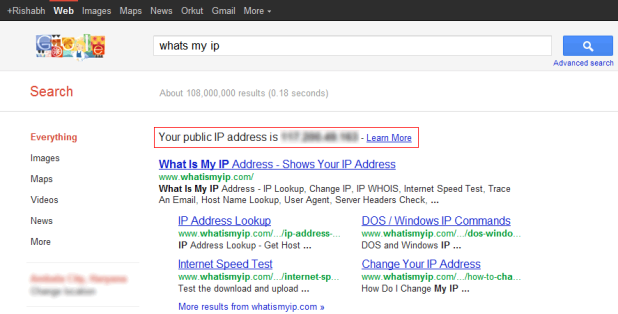
Sometimes we wanna know what is the real IP address we are owning and we make a search in Google and some sites gives you all the details about your IP Address. But now knowing your IP address is quit simple because Google now displays your IP Address on its search page like below .:
How to view your IP Address through Google Search
So as we can see in the above image there is a Red Highlighted Box displaying your Public IP Address so how to see yours well you simply have to open Google.com and than make a search what's my ip and that’s it now you will get search results containing your IP Address and some websites for easy access.

Sunday, October 2, 2011

Get UC web browser 8 mini

New Ucweb Browser Mini 8.0 has been released and available for download, well it has fixed many things so its really great for download you can check all the new features below.
 

Features of Ucweb Browser 8.0 .:

  • Optimized for Low-end S40 phones and other low memory phones.
  • Bookmarking any page further optimized, easy to operate.
  • Network, support menu actions.
  • Repair the night mode does not display a picture of the problem.

DOWNLOAD HERE

Saturday, September 17, 2011

How to Speed up your Internet

The internet browsing speed can be utilized to the maximum extent which one's internet service provider is providing by following the below steps, which basically is not used to the fullest level due to reasons like of DNS and so on.


Changing of the DNS(Domain Name System) of the current service provider to the fastest DNS servers of the ones like of OpenDNS or Google public DNS will do the required trick. This speeds up the loading time taken for the webpages which r browsed. DNS Servers are used by the internet connection to the correspondence between a domain name and IP address corresponding(each websites has an IP address and can be accessed directly from those IP addresses). It indeed makes the browsing of the internet easier using domain names rather than sequences of numbers. Whenever you call a page, images that are loaded or download files, a DNS server is used.

The procedure to attain it with xp and windows 7 and linux and Vista is different and explained below.


1) Procedure for XP : The parameters of the network connection of the Windows XP computer must be changed to declare a new DNS servers. it can be done like this --


  • Click the Start button and then click Control Panel.
  • Click Network and Internet Connections.
  • Click on Network Connections.
  • Double click the icon for your network connection.
  • Click the Properties button.
  • Double click the item Internet Protocol (TCP / IP).
  • Select Use the DNS server addresses on this windows.
  • Then enter the Preferred DNS server field the first DNS server address to use for Google 8.8.8.8 Public or DNS to OpenDNS 208.67.222.222.
  • Then enter the DNS server field the second DNS server address to use for Google 8.8.4.4 Public or DNS to OpenDNS 208.67.220.220.
  • Click OK twice and then click Close.
  • Reboot the system. The new settings are then applied. Launch your Web browser and visit your favorite sites. They should receive more smoothly and quickly.
 
2) Procedure for Windows 7 : The New DNS servers definition in Windows 7 goes through the Network and Sharing center. It can be configured like this--

  • Click the Start button and then click Control Panel.
  • Click Network and Internet.
  • Click Network and Sharing Center.
  • In the left pane, click Change settings of the card.
  • Double click the icon for your network connection (this can be a cable connection or wireless).
  • Click the Properties button.
  • Double click on the icon Internet Protocol Version 4 (TCP/IPv4).
  • Select Use the DNS server addresses.
  • Then enter the Preferred DNS server field the first DNS server address to use for Google 8.8.8.8 Public or DNS to OpenDNS 208.67.222.222.
  • Then enter the DNS server field the second DNS server address to use for Google 8.8.4.4 Public or DNS to OpenDNS 208.67.220.220.
  • Check the box Validate parameters and left click OK and Close.
  • The new settings are then applied and your network connection is verified. Click Close.
  • Launch your Web browser and visit your favorite sites. They should receive more smoothly and quickly.

3) Procedure for Windows Vista is same as the procedure for Windows 7.

4) Procedure for Ubuntu Linux : Declaration of DNS servers for internet usage is easier in Ubuntu Linux. IT is configured like this --

  • On Ubuntu, click on the System menu.
  • Click Preferences, then Network Connections.
  • Click your network connection (this can be a cable connection or wireless) and click Modify.
  • Open the Settings tab IPv4.
  • Scroll Method and select automatic addresses only (DHCP).
  • In the DNS Servers field, enter the addresses of DNS servers to use, separated by a space. For example 8.8.8.8 8.8.4.4 for Google or Public DNS to OpenDNS 208.67.222.222 208.67.220.220.
  • Click the Apply button, type your password and confirm with authentication.
  • Finally, click Close. Launch your Web browser and visit your favorite sites. They should receive more smoothly and quickly.

NOTE : Both the OpenDNS and Google public DNS are much faster DNS servers and OpenDNS seems to be a bit faster than that of the Google public DNS.

Monday, September 12, 2011

How to change Facebook theme

The days of MySpace are over, and with it goes the customization of one’s profile. It’s not a surprise why Facebook does not allow users to customize their profile with themes, graphics, gif’s and other visual effects. The horror stories of MySpace profiles gone wrong reach to the sky and I’m sure that the last thing Facebook wants to happen is someone getting an epileptic shock when they visit someone’s profile.
That said, there are some hacks to get around this “annoyance.” Just like the unofficial Dislike button (Firefox plugin), there are unofficial themes available. However, there is a catch to these themes. Since Facebook does not allow you to modify the CSS or HTML of your profile page, it means that whatever customization’s you make to your profile with these  skins will only be visible to you and no one else.
Probably not the answer you wanted to hear, but it is better than nothing at all. In order to get the themes to work, you will have to use a browser plugin. Most skin websites support Firefox, Internet Explorer and Google Chrome. That being said, the vast majority of the themes follow the idea of MySpace themes. I have listed a few of the sites below.
fbSKins: One of the premier Facebook skin websites, this site carries over 50,000 skins. Best of all, unlike other skin websites which require that you install crapware such as toolbars and the likes, all you have to do is install the plugin and the skins will work.
pageRage: Another website offering free Facebook skins, Page Rage also allows you to create your own skins. They offer premium memberships as well, though I highly doubt that such an option would be of interest to most individuals.
Just remember that whatever theme or skin you decide to use, will only be visible by you. So in the end, it defeats the purpose but for those who are still stuck in the MySpace era, this is for you like chips are to a recovering smoker. Enjoy.

Thursday, September 8, 2011

PC Auto Shutdown 4.9 Download

PC Auto Shutdown is a handy software that helps you automatically shutdown, power off, reboot, hibernate, suspend or log off computers at schedule time you specifies. It can shut down computers at schedule time when no user is logged in or when computers are in suspended power conservation mode.
It gives you different ways to schedule the shutdown event for your needs, such as daily, weekly and only once. During the shutdown, it can clean up Recycle Bin, temporary files, IE cache, IE cookies, IE history, IE auto- complete entries and recent document list to improve system performance and protect your privacy.


Its really a handy software @ time you r downloading is going on and you wanna go to sleep than simply adjust the time and see working of this software. So have downloading this useful software from below link and do comment if you face any problems.

Related Posts Plugin for WordPress, Blogger...