This is default featured slide 1 title

Go to Blogger edit html and find these sentences.Now replace these sentences with your own descriptions.This theme is Bloggerized by Lasantha Bandara - Premiumbloggertemplates.com.

This is default featured slide 2 title

Go to Blogger edit html and find these sentences.Now replace these sentences with your own descriptions.This theme is Bloggerized by Lasantha Bandara - Premiumbloggertemplates.com.

This is default featured slide 3 title

Go to Blogger edit html and find these sentences.Now replace these sentences with your own descriptions.This theme is Bloggerized by Lasantha Bandara - Premiumbloggertemplates.com.

This is default featured slide 4 title

Go to Blogger edit html and find these sentences.Now replace these sentences with your own descriptions.This theme is Bloggerized by Lasantha Bandara - Premiumbloggertemplates.com.

This is default featured slide 5 title

Go to Blogger edit html and find these sentences.Now replace these sentences with your own descriptions.This theme is Bloggerized by Lasantha Bandara - Premiumbloggertemplates.com.

Showing posts with label idm. Show all posts

Saturday, September 3, 2011

How to download torent files using IDM

1. Choose your torrent website - piratebay.org - torrentz.com - ahashare.com
2. Go to your choosen torrent website (prefer piratebay/ahashare).
3. Search what do you want.
4. Copy the link.
5. Go to torrific.
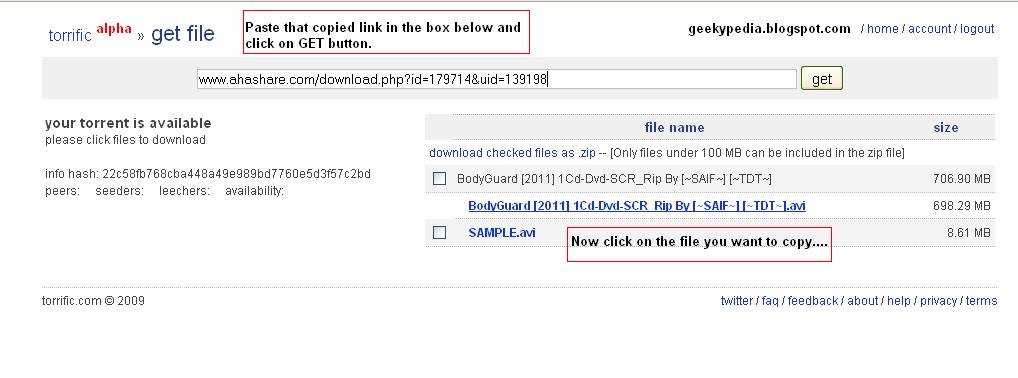
6. Paste it to [get] box.
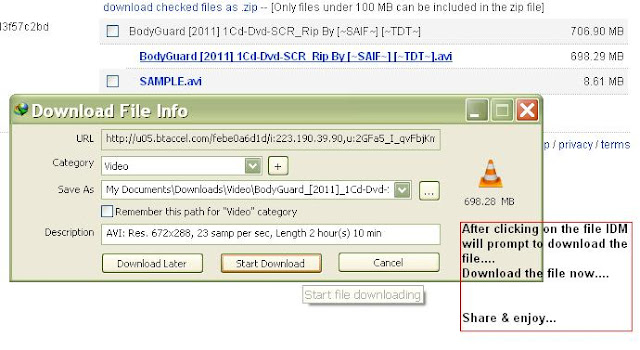
7. Download it using IDM-the fastest download manager.
See the screenshots below:

▬ Create a torrific account

▬ Now go to your preferred torrent site and choose to download the torrent file as shown below.               


▬ Copy the URL from the IDM download prompt.


▬ Now LOGIN into your Torrific account and paste that URL in the box And then click on the GET button.


 ▬ Finally click on the file you want to download and you can see a IDM download prompt.
IDM - Internet Download Manager 6.07 Build 9 Update Full Version Download

What is IDM for the Noobs .:

Internet Download Manager is one of the best download client available up to date. It is rewarded as the best client because it gains up to double your internet speed for downloading purpose and its really an lightweight download manager.
Just simply download the new build from below and after installation patch it up so that it becomes full version.

DOWNLOAD HERE


How to use the Patch Provided .:

1. After the installation just close the IDM from the task manager.
2. Now open the patch as an Administrator, you can do this by right clicking and choosing Run As Administrator.
3. Now you will something like below just click Patch Server Check.

 4. Just click on the patch server check and a new window will pop up saying browse the file, now just navigate to Program Files > Internet Download Manager and select IDMan.exe and that click on open like below .:


5. Now you will see Patch Successful notification in the Patch Application like below .:

 6. That’s it now if you had installed this one freshly than copy the below serial and enter it in the Registration Tab in Internet Download Manager.

Related Posts Plugin for WordPress, Blogger...