This is default featured slide 1 title

Go to Blogger edit html and find these sentences.Now replace these sentences with your own descriptions.This theme is Bloggerized by Lasantha Bandara - Premiumbloggertemplates.com.

This is default featured slide 2 title

Go to Blogger edit html and find these sentences.Now replace these sentences with your own descriptions.This theme is Bloggerized by Lasantha Bandara - Premiumbloggertemplates.com.

This is default featured slide 3 title

Go to Blogger edit html and find these sentences.Now replace these sentences with your own descriptions.This theme is Bloggerized by Lasantha Bandara - Premiumbloggertemplates.com.

This is default featured slide 4 title

Go to Blogger edit html and find these sentences.Now replace these sentences with your own descriptions.This theme is Bloggerized by Lasantha Bandara - Premiumbloggertemplates.com.

This is default featured slide 5 title

Go to Blogger edit html and find these sentences.Now replace these sentences with your own descriptions.This theme is Bloggerized by Lasantha Bandara - Premiumbloggertemplates.com.

Showing posts with label smartphone. Show all posts

Monday, January 28, 2013

Download PC suite for all mobiles

Hey this is +jane Gomez, I'm here today with a new software which I'm sure you all will love. Its a software for us, yes the teens/geeks who are fascinated with all gizmos. People like me who maintain more than one mobile will definitely love this software. MobilEdit is a PC suite for all mobiles, yeah! you heard it right it supports almost all mobiles. Now you don't have to install different PC suites for all your mobiles just download MobilEdit and you are done.

Lets talk about its features:


  • The only universal PC Studio with thousands of phones supported
  • Manage, improve and print a phonebook from the comfort of a computer
  • Copy phonebook from any phone to a new phone regardless of manufacturer or system
  • Backup all phone content to a PC or Internet cloud storage
  • Complete ringtone editor
  • Built-in video editor
  • Live view of phone and card memory, battery, signal, IMEI and more
  • Contact optimization and internationalization
  • Copy pictures and videos between phone and PC
  • Download, read, store and print text messages
  • Send text messages using PC keyboard
  • Install applications to the phone from a PC


Now my personal experience:
I have connected lot of my devices to name a few Nokia E63, E5-00. My android devices Micromax A110, Huawei Google X5 pro, Samsung Galaxy Note, also connected my Ipod.

The software was good with all the devices but Ipod, as we are aware how apple is concerned about its privacy that can be justified. Although i love the software still they have to work on their UI, yes the UI is not that good according to me.


Download the crack 

DOWNLOAD


Wednesday, January 23, 2013

One IM client for all instant messenger

Hey this is +jane Gomez, good evening to everyone, so today I've got you a new application its called Trillian. It is an application which bundles most of the IM services we use into a single window. I hope all of you are aware about NIMBUZZ IM, trillian also have the same feature but with an extra zing, which makes it superior to Nimbuzz. The thing is the Trillian is available for almost the platforms  Windows, MacOS X, Android, iPhone, BlackBerry, and the Web.


Also it has more number of IM services along with to name a few chat networks Facebook, Skype, Google, AIM, ICQ, MSN, Yahoo, XMPP and IRC.


Trillian is also great for social network support. Keep in touch with your social world on Twitter, Facebook, Foursquare and LinkedIn.


Mail notifications on most IM networks combined with IMAP and POP3 support help you easily check mail and even mark items as spam.
>>> Setup Tutorial <<<
Comming to privacy, no need to worry Your security and privacy are respected.

You might also like:


Download the free version from the official website first(above link).
Download the Crack notes from below link.


Tuesday, March 27, 2012

Download Angry Birds Space full version

Angry bird the astonishing game from ROVIO has got all new look and feel. The birds and the green pigs have actually gone into the space and the famous rivalry continues there too.  
Rovio and NASA have joined together to bring everyone’s favorite birds and their green pig rivals to Android, iPod Touch, iPhone, iPad, Windows & Mac in the latest installment of the franchise: Angry Birds Space. Set in a space-themed environment, this release brings an entirely new level of game play to the series not seen in any of the earlier three versions. Read on for more information.


 "This one is the best from the franchise" 

DOWNLOADS:


DOWNLOAD FULL VERSION FOR PC FREE:

 Download and install the game onto your PC from above PC link and then download the CRACK from below link:


DOWNLOAD

Installation:

  1. Install AngryBirdsInstaller_1.0.0.exe
  2. Copy patch in the crack folder and paste it into game directory
  3. Run patch
  4. Run the game
  5. Press Activate Full Game
  6. Enter any key to active then press register
  7. Enjoy the game.


Saturday, February 4, 2012

Tubemate youtube downloader for android


TubeMate is the best and free applications available for Android which allow you to download or play any YouTube video in the up to Full-HD best quality. For full YouTube experiences TubeMate offer you different download options to choose from. New 1.05.24 version released.

TubeMate is the fastest and most famous YouTube downloader and makes you enjoy mobile YouTube and download videos with fastest speed on your android device in various resolutions up to Full-HD(1080p). You also can audio mp3 version for any video you need. TubeMate allow you to search in YouTube or you also can enter any YouTube url in TubeMate address box. TubeMate offer two type of homepages, one will show online videos from YouTube or second is an offline hope which allow you to manually enter video URL.
TubeMate also support resume feature to anytime stop or restart the download from same point. This make you easily download large video files from YouTube. The best part is the downloading always happens in the background so you can go on watching other YouTube videos or can surf the Internet in meantime. The latest version of TubeMate is support all Android 1.6 and above smartphones but currently not available in Android Market but you can download it here from link in end of post.

Features in TubeMate YouTube Downloader:
~The original fast download technology
~ Fast download mode with multiple connections for a download
~ Multiple download resolution options to choose
~ Support background download and multi-downloads
~ Resume support for downloading
~ Options to convert to MP3 (powered by MP3 Media Converter)
~ Playlist as video/audio(powered by Meridian Player)
TubeMate Downloader
~ Share your video finds via Google Buzz, Twitter or e-mail at the tap of a button
~ YouTube search and related videos suggestions
~ Allow to login to your YouTube account so you can save favorite videos or create playlist.

Supported Resolutions for Video Download:
~1920x1080(Full-HD): GalaxyTab, Galaxy S2, PC
~1280x720(HD): high-end devices
~640x360: general devices
~320x240: low-end devices
~640x360, 854x480(FLV)
Though the available options depend on the quality of the uploaded video and your device.

How to Download Video Files Using TubeMate:
~ Launch TubeMate app
~ Choose video in the mobile youtube you wants to download.
~ Click video or overlay down-arrow button to start download.
~Wait for it to fetch video information and to show download options.
~ Now choose the resolution you want to download.
~ On clicking, it starts to download and a notification shows up.
~ You can pull down notifications bar, and click a notification to show the information of downloading.
~ You can see the dialog for downloading status with the current speed of downloads.
~ After finishing, you can access downloded files in the download list. To access download list, please push 'menu' button of your device or simply browse for video folder in your memory card storage.

Whats New in TubeMate v1.05.24.159 (or 1.05.24.160):
~Quick fix for YouTube change causing parsing error in some videos
~ Fix fetch error on some videos(safe mode)
~ Faster launching
~ Fix WiFi problem

Download Link New TubeMate v1.05.24 Android 1.6+:
TubeMate_1.05.24.apk (909 KB)


Saturday, December 10, 2011

Nine reasons why IOS is behind Windows Mango


Apple IOS 5 is the latest version of OS for Apple Products. It is no doubt that Apple is a great company and It is having its mobile OS IOS 5.Which might be the most amazing OS because of a lot of apps and in Many other features. There was not competitor for IOS from a lot of time but Now Microsoft tries to be head to head to Apple with its OS mango which is better than the IOS in some cases. We still can not verify that Mango is better then IOS after all IOS belongs to a company which always tries to be different and there is more apps on the INTERNET for IOS than Mango but here is some points where apple Fails to stand in front of Mango. Following are the Ways where Mango Is better than IOS


Live tiles for Mango
                                         Mango is having a live tiles option which is same as widgets in Androids but the Difference is, In android widgets sucks your phones battery but in Mango it is really amazing feature. It can show your facebook updates to you on your home screen. This is some kind of different thing and it is quite good also. But IOS is not having any of there features.

Contact profile of Mango
In the Mango’s contact profile it shows each and every thing about Person in the same place. Such as information about Calls, SMS, Chat, E-mail, voice-mails, face-book, twitter are kept at the same place and are stored in a ordered manner and shown in a user friendly way which is better then IOS.

Built in Apps Like Image search or Bar-code scanner
Mango comes with built in apps Of scanning images and bar-codes to get the prices. Although we are having the same feature in IOS but we have to use Apps but In mango It is built in.


Social Networking
Mango is having a better integration of social networking sites. It is easy to share with mango then IOS.

Multitasking In mango is good
                                             When you see the used apps in apple it only shows the app Icon which is not enough for you to tell what were you doing but in mango it keeps the actual screen shots of the App which is really helpful.

Native Facebook Chat
Mango is having a native facebook chat option which is really a amazing Feature to Chat your online friends when you are online on facebook.

Built in Support office documents
We are talking about Microsoft so how can we forget Microsoft’s document editing tool. It is having a good integration. While in IOS you have to buy application to do the same thing.


Apps Pinning is the amazing feature
You can pin any part of the app so that you can get an easy access to that task. E.g. in case of facebook you can pin message, events etc. to get the instant access.

Battery life
We all knows that apple’s IOS 5 is having battery sucking problem although they are trying to make good but in some phones problems is still there. But on the other had Windows OS is known for its battery life.windows OS is having a excellent resource of power management. That why windows Phones are still with a single Core processor.
These are some places where Mango wins in front of IOS.
The above criteria is just according to us.

Monday, December 5, 2011

Ice Cream Sandwich Keyboard on any anDroid mobile


Ice Cream Sandwich Keyboard is one of the newest keyboard available for Android 4.o with lots of new features. Now you can use it on your older Android devices without rooting. To try the new Keyboard you have to download and install the new Ice Cream Sandwich Keyboard app from Android market. This keyboard is only compatible with phones and it doesn’t play nice with tablets.
Ice Cream Sandwich Keyboard can be installed on almost all devices that are based on the said Android 2.2 or newer versions of Google’s platform. It supports whole lot of languages like English, French , Hebrew, Arabic, German, Czech, Bulgarian, Catalan, Spanish, Esperanto, Danish, Italian, Finnish, Georgian, Russian, Ukrainian, Latvian, Swedish,Latin, Dutch, Portuguese, Slovakian, Slovenian, Greek,Serbian, Hungarian,Swiss.
How to Install Ice Cream Sandwich Keyboard

How to Install Ice Cream Sandwich Keyboard on Your Android Phone:-
1. Go to the Android market and download the Ice Cream Sandwich Keyboard app
2. After the installation go to your home screen and press the menu button and then choose Settings > Language & keyboard section.

3. Now Check the box next to Ice Cream Sandwich keyboard and after that tap on Ice Cream Sandwich keyboard settings.
Ice-cream-sandwich-keyboard
4. Now you can see the Ice Cream Sandwich keyboard settings, adjust the keyboard setting as per your requirement.
Ice-cream-sandwich-keyboard-settings
5. After this, go back to home screen open Gmail or SMS to write something. Now Press and hold on the input area. Select Input method.

6. And now Select Ice cream Sandwich Keyboard from Select Input method.

7. That’s it now you are are using the new Android 4.0 Ice Cream Sandwich Keyboard on your Android phone.
ice-cream-sanwich
Note that some features may be a little buggy; this is because the keyboard is in beta and your device is running a different version of Android.
 

Thursday, November 24, 2011

Send free sms to any mobile in the world

The famous Sabeer Bhatia behind the very popular HOTMAIL has come up with a fresh hot idea, its nothing but simple SMS but with this service you can send SMS to any mobile number in any part of world for free. The best part is its not necessary that the person on other end must have the same software installed on his system.
Jaxtr SMS is an advertisement supported multi - platform mobile application that he claims will make SMS as we know it redundant as it lets users with data connection send messages to any other mobile phone - domestic and international - free.
You might be thinking that you can get many apps like these which gives you free SMS sending feature but this is something different your recipient to whom you are sending SMS does not need to have any app from JaxtrSMS installed to receive SMS on their phone. So now simply visit their website and download apps according to your device like they have app for Android, iPhone, Blackberry, Windows Phone, Java Based Phone, Symbian Devices and Rest of the Sets from Nokia.

Facebook Fan Page

Sunday, September 18, 2011

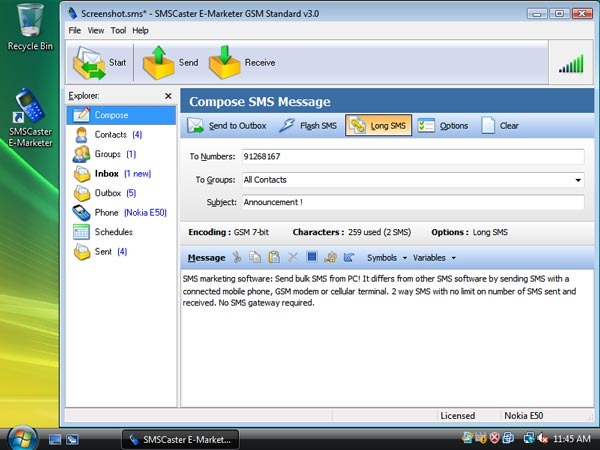
How to send bulk SMS (software)

SMS Caster is an awesome SMS Mobile Marketing Software which can deliver your SMS right from your PC and in Bulk amount. The software simply detects the mobile connected and automatically choose appropriate settings for it. You just have to type a nice SMS and then Boom !!! Marketing starts right from your desktop.

Some Key Features Of SMS Caster Software .:

  • “Send thousands of SMS easily from the computer”
  • “Receive incoming SMS into the computer (2-way SMS) ”
  • “No registration, no credit prepay, no SMS gateway required”
  • “Support Long SMS, Flash SMS, SMS Mail Merge”
  • “Use your existing Nokia, Sony Ericsson or Motorola mobile phone!
Bulk SMS Text Messaging Software for Mobile Marketing

DOWNLOAD HERE

If you want to get more detailed information about this software than you can visit its official website for how-tos and support.

Friday, September 9, 2011

Turn Your Smartphone into a Webcam with SmartCam


Windows only: Free, open source application SmartCam turns your Symbian Series 60 smartphone into a wireless Bluetooth webcam. Just install the program in Windows (works in XP and Vista) and install the client to your smartphone (be sure to follow the readme in the \win\installer directory). When it's all set up, your SmartCam works with Skype and most other video chat services, meaning that if your computer doesn't have a webcam but you've got Bluetooth and a Symbian smartphone, you're in luck. SmartCam is a free download, Windows only.

Download SmartCam
 

Related Posts Plugin for WordPress, Blogger...