This is default featured slide 1 title

Go to Blogger edit html and find these sentences.Now replace these sentences with your own descriptions.This theme is Bloggerized by Lasantha Bandara - Premiumbloggertemplates.com.

This is default featured slide 2 title

Go to Blogger edit html and find these sentences.Now replace these sentences with your own descriptions.This theme is Bloggerized by Lasantha Bandara - Premiumbloggertemplates.com.

This is default featured slide 3 title

Go to Blogger edit html and find these sentences.Now replace these sentences with your own descriptions.This theme is Bloggerized by Lasantha Bandara - Premiumbloggertemplates.com.

This is default featured slide 4 title

Go to Blogger edit html and find these sentences.Now replace these sentences with your own descriptions.This theme is Bloggerized by Lasantha Bandara - Premiumbloggertemplates.com.

This is default featured slide 5 title

Go to Blogger edit html and find these sentences.Now replace these sentences with your own descriptions.This theme is Bloggerized by Lasantha Bandara - Premiumbloggertemplates.com.

Showing posts with label youtube. Show all posts

Wednesday, March 14, 2012

Download the latest SPLASH PRO EX player


Hello guys today we bring you the all new Splash PRO EX player. Splash PRO EX combines all the features of Splash PRO with easy and fast exporting of videos to popular devices, Facebook, YouTube™ and more... 
"Its an amazing player with extra ordinary capabilities." 


Designed and optimized for HD!

Play and convert all your High Definition movies and camcorder clips, incredibly fast, smooth and without problems. You don't need any additional codecs. Download, install, watch, convert and share. It takes about one second to start application and High Definition video playback!

Converting video with style!

Enjoy the ultimate performance and stylish user interface. Select one of many predefined profiles and push a button to export your clips easily and fast to popular formats, your favorite multimedia devices, Facebook or YouTube™ . Save energy and time choosing optimized and hardware accelerated video exporting with Splash PRO EX.

Picture² - just stunning video quality!

Advanced picture post-processing engine, delivering stunning video quality. Watch standard and high definition videos like never before, enjoy smooth motion, crisp details and vivid colors. 


Enjoy the ultimate performance!

Take advantage of the latest hardware acceleration technologies to save your time and reduce power consumption. Splash PRO EX combines all the latest technologies including NVIDIA® CUDA™ and
Intel® Quick Sync Video with hardware accelerated video decoding to boost exporting process even more!
High quality video scaling.

Convert your videos with advanced video preprocessing technologies. Splash PRO EX high quality scaling keeps your videos sharp and clean every time you export your original video to lower or higher resolutions. The technology is optimized for multicore CPUs to provide an excellent performance.

The best player for your HD camcorder clips!

Supports AVCHD™ format. Rediscover High Definition quality with Splash PRO EX and state-of-the-art Picture² technology! Watch your 20/24/25/30p clips smooth like never before with Motion² technology. Browse your clips directly from the AVCHD™ camcorder with HD Camcorder interactive menus.

Saturday, February 4, 2012

Tubemate youtube downloader for android


TubeMate is the best and free applications available for Android which allow you to download or play any YouTube video in the up to Full-HD best quality. For full YouTube experiences TubeMate offer you different download options to choose from. New 1.05.24 version released.

TubeMate is the fastest and most famous YouTube downloader and makes you enjoy mobile YouTube and download videos with fastest speed on your android device in various resolutions up to Full-HD(1080p). You also can audio mp3 version for any video you need. TubeMate allow you to search in YouTube or you also can enter any YouTube url in TubeMate address box. TubeMate offer two type of homepages, one will show online videos from YouTube or second is an offline hope which allow you to manually enter video URL.
TubeMate also support resume feature to anytime stop or restart the download from same point. This make you easily download large video files from YouTube. The best part is the downloading always happens in the background so you can go on watching other YouTube videos or can surf the Internet in meantime. The latest version of TubeMate is support all Android 1.6 and above smartphones but currently not available in Android Market but you can download it here from link in end of post.

Features in TubeMate YouTube Downloader:
~The original fast download technology
~ Fast download mode with multiple connections for a download
~ Multiple download resolution options to choose
~ Support background download and multi-downloads
~ Resume support for downloading
~ Options to convert to MP3 (powered by MP3 Media Converter)
~ Playlist as video/audio(powered by Meridian Player)
TubeMate Downloader
~ Share your video finds via Google Buzz, Twitter or e-mail at the tap of a button
~ YouTube search and related videos suggestions
~ Allow to login to your YouTube account so you can save favorite videos or create playlist.

Supported Resolutions for Video Download:
~1920x1080(Full-HD): GalaxyTab, Galaxy S2, PC
~1280x720(HD): high-end devices
~640x360: general devices
~320x240: low-end devices
~640x360, 854x480(FLV)
Though the available options depend on the quality of the uploaded video and your device.

How to Download Video Files Using TubeMate:
~ Launch TubeMate app
~ Choose video in the mobile youtube you wants to download.
~ Click video or overlay down-arrow button to start download.
~Wait for it to fetch video information and to show download options.
~ Now choose the resolution you want to download.
~ On clicking, it starts to download and a notification shows up.
~ You can pull down notifications bar, and click a notification to show the information of downloading.
~ You can see the dialog for downloading status with the current speed of downloads.
~ After finishing, you can access downloded files in the download list. To access download list, please push 'menu' button of your device or simply browse for video folder in your memory card storage.

Whats New in TubeMate v1.05.24.159 (or 1.05.24.160):
~Quick fix for YouTube change causing parsing error in some videos
~ Fix fetch error on some videos(safe mode)
~ Faster launching
~ Fix WiFi problem

Download Link New TubeMate v1.05.24 Android 1.6+:
TubeMate_1.05.24.apk (909 KB)


Wednesday, February 1, 2012

How to access all google services quickly

Looking for a Chrome extension that lets you quickly access all Google Services while you browse the web? Terminal For Google is a prefect tool for instant access to Google services. With it, you can open any Google Service with only a click or two. The extension displays Google services, such as Google Reader, Gmail, Google Docs, Blogger, AdSense, Analytics, Google Maps and more, in a compact pop-up with shortcut buttons. Furthermore, Terminal For Google allows you to mail or blog a particular page from the right-click context menu; also, an unread count for both Gmail and Google Reader is displayed in the pop-up. Click the Option Page to customize and change the settings for the extension.
Once you’ve installed the Terminal For Google, simply click the button in the toolbar and all Google services will be displayed in a pop-up. Simple click one and it will open in a new tab. You will also notice a count of unread items on the Google Reader and Gmail button. To change the settings of the extension, simply click Option Page, displayed at the bottom of the pop-up.
popup
The Options let you view all the enabled and disabled services. By default, the extension groups some services in the disabled category, and you can easily enable these by dragging them to the enabled services box. At the bottom of the options page, you will also find Gmail, Google Reader and Google URL Shortener options. From here, you can enable the check unread count option for both Gmail and Google Reader.
Optionss
Terminal For Google is an easy-to-use extension that allows you to save both time and effort, when you want to access one or multiple Google services while you work online. You can install the extension from the link below.


Wednesday, November 2, 2011

How to set multiple homepages on ur browser

Today's trick is to set multiple of home pages in firefox. So here is the trick..
Did you people ever wish to set-up multiple home pages in Firefox?

If you said yes, then you are at the right place. Here’s the way to do this little but, useful little trick.

Suppose you would like to set Facebook, Google and YouTube as your homepages. Then try this tweak in Firefox to set multiple homepages. This is what you should do:

  1. Go to Tools>Options>Main
  2. In the When Firefox starts drop down menu choose Show my home page.
  3. In Home page give your homepages separated by a | (pipe symbol).
  4. Click OK  
Facebook Fan Page


For example: http://www.google.com|http://www.geekypedia.blogspot.com|http://www.facebook.com

Tuesday, October 11, 2011

Top 5 websites to repair your PC

Websites
5 websites that teach you to repair your own computer.


Tired of spending extra money on getting your computer fixed? Tired of pathetic customer service? Then you might consider reading this. Here is a list of the top five websites where you can learn to fix your own computer and their links :

1. Fixing My Computer
At Fixing My Computer you can get detailed information and flowcharts on every part of the computer. This site is a great resource for people who are looking for some ‘Do it yourself’ computer repair guide. When you enter the site, you’ll see four main headers, saying Home, fix windows xp, enter forum and secure & back up. Vertically along the left hand side, there is a menu system that looks like a file explorer. You’ll find categories for any kind of repair you are looking for.
2. DIY Computer Repair
This site is pretty much similar. They have a long menu listed on the left of the screen, vertically. With the amount of information that is provided in this site, you will not only be able to fix your PC but also build a custom PC from scratch. There is also a header at the top called ‘the fix it blog’ where you can blog your comments, ask a question and get an answer for making an interactive session.
3. LaptopMag
This is another site dedicated to provide you free information on PC repair in a easy way. Like the above mentioned two, this site too has a long menu on the left of the screen, vertically. There is an article which I personally recommend because it gets right to the point with the most common laptop related problems.
You can go through all of the eleven pages or you can use the dropdown menu at the bottom of every page to jump the topic which is most relevant to you for the moment. This article discusses about a lot of problems like battery not charging, overheating, virus or spyware infestation etc.
4. Fixed4Free
This site is not a dedicated computer repair site, however it has a huge menu of PC problems and how to solve them. Firewalls, hardware, virus removal to printers and scanners. As well as other household and electronic equipment.
5. YouTube
YouTube is the most popular video sharing community in the world. You can definitely find some video lessons on PC repair here. You can even share your own video of fixing your PC if you think you did good.

A few of the other sites which did not make the list, but are pretty much up to the mark:
1. AcmeHowTo

Just like fized4free, acmehowto too is not a site dedicated to computer repair. However, their PC repair section is pretty detailed and covers a lot of the common problems. Most of it is about hardware, other issues are not well elaborated.
2. YahooAnswers
YahooAnswers is the most popular computer and internet community. You can search through the many questions already answered and it’s most likely that someone else had a similar problem that you have. This helps you save time by not having to re-ask the same question and waiting for an answer.

Like us on FB

Thursday, September 22, 2011

Edit your youtube videos online

Recently YouTube Launched its new feature built-in video editor, which allows you to edit your video online with simple and easy steps. So now you can edit your video on YouTube site like basic edits, shorten your video, swap out the soundtrack, etc. Now you can see the new “Edit Video” button on your Youtbe Video Page. An “Edit Video” button allows changes such as adding effects, swapping soundtracks, or trimming clips right at YouTube.


Here is the Guide Which will help you to Edit Your YouTube Video Online:-
1. Just click Edit video on the video’s page or on your My Videos page


2. Now you can see some option like rotate a video, and boost the contrast and colors.


3. You can also change the effect of Video By Clicking Effects Option.


Monday, August 29, 2011

Easy Youtube video downloader

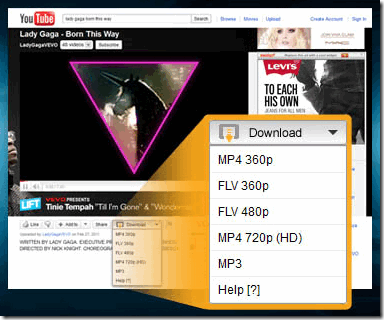
Easy YouTube Video Downloader is a great Add-On for Firefox which gives you direct option to download videos directly from YouTube. This Add-on is really easy to install and gives you direct downloadable links so see below to download the Add-On.

Steps to download the YouTube Downloader Add-On .:

1. Open the Firefox, if you are not having then download Firefox
2. Now Install Easy YouTube Video Downloader
3. Now you have installed the Add-On simply open YouTube Website
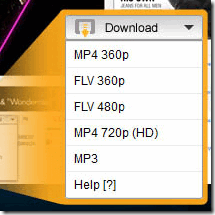
4. Now choose any video to watch now you can see you will get a button for downloading video in different formats.

Check the below screenshots .:

Easy YouTube Video Downloader Firefox Add-On
So now enjoy easy YouTube Video downloading with this great add-on.

Related Posts Plugin for WordPress, Blogger...